 Private Downloader
Save the video you're watching. Nothing leaves your computer.
Private Downloader finds the video on the page, whether it is a file, a stream, or a live broadcast, and saves it as one file you can play anywhere. Everything happens inside your browser. There is no account, no server, and nothing is ever uploaded.
- Firefox, Firefox for Android, Chrome, and Edge
- Ten downloads free
- $19 once, 30-day refund
- No account, ever
Private by design, not by promise
Most downloaders are trusted with every page you visit. Private Downloader is built so there is nothing to trust it with.
Nothing leaves your device
Videos are found, fetched, and assembled inside the extension. Video is requested only from the site you are watching, with the cookies your browser already sends it. No copy passes through anyone else's server.
No account, no telemetry
No sign-up, no analytics, no crash reports, no ads. The store listing declares that no data is collected, and the extension never contacts us for anything.
The code you install is the code that runs
No remote code and no remote configuration. Some downloaders do their work on their own website, next to ads, with code that can change without a store review. Everything here ships inside the extension and is reviewed with it.
A key that works offline
Your unlock is checked on your own device against a public key built into the extension. It never phones home, keeps working without a connection, and works on all your own devices.
Private windows stay private
Downloads keep your private window or container identity, private-window saves never reach the history, and unfinished private downloads are never written to disk.
Help without handing anything over
If a site does not work, the popup writes a report you can read before you send it: fixed labels and counts, with no page addresses, titles, tokens, or cookies.
See it work
What it saves
Files
MP4, WebM, MOV, M4V, and Ogg videos, including signed or opaque addresses, videos inside embedded players, and files a page fetches itself and plays from memory.
HLS streams
Transport-stream, fragmented-MP4, and audio-only segments, AES-128 encryption, separate audio tracks, discontinuities, and live streams recorded until you press Stop, from now or from the start of the stream's window.
DASH and more
DASH with separate video and audio, live DASH, and multi-period programmes joined into one file. Smooth Streaming too.
Players that hide their source
Record playback captures what a player loads as it plays, up to eight times faster than real time, without re-encoding. It never records DRM-protected video.
Every common codec, never re-encoded
H.264, HEVC, MPEG-2, VP9, and AV1 video; AAC, MP3, AC-3, E-AC-3, DTS, Opus, and Vorbis audio. Repackaged as they are, so quality is exactly what the site sent.
Subtitles, captions, no ads
Subtitles and closed captions go inside the video and as a .vtt file; subtitles drawn as pictures come as a .sup file. Ad breaks a stream marks are left out.
Built not to fail halfway
Pause, resume, carry on
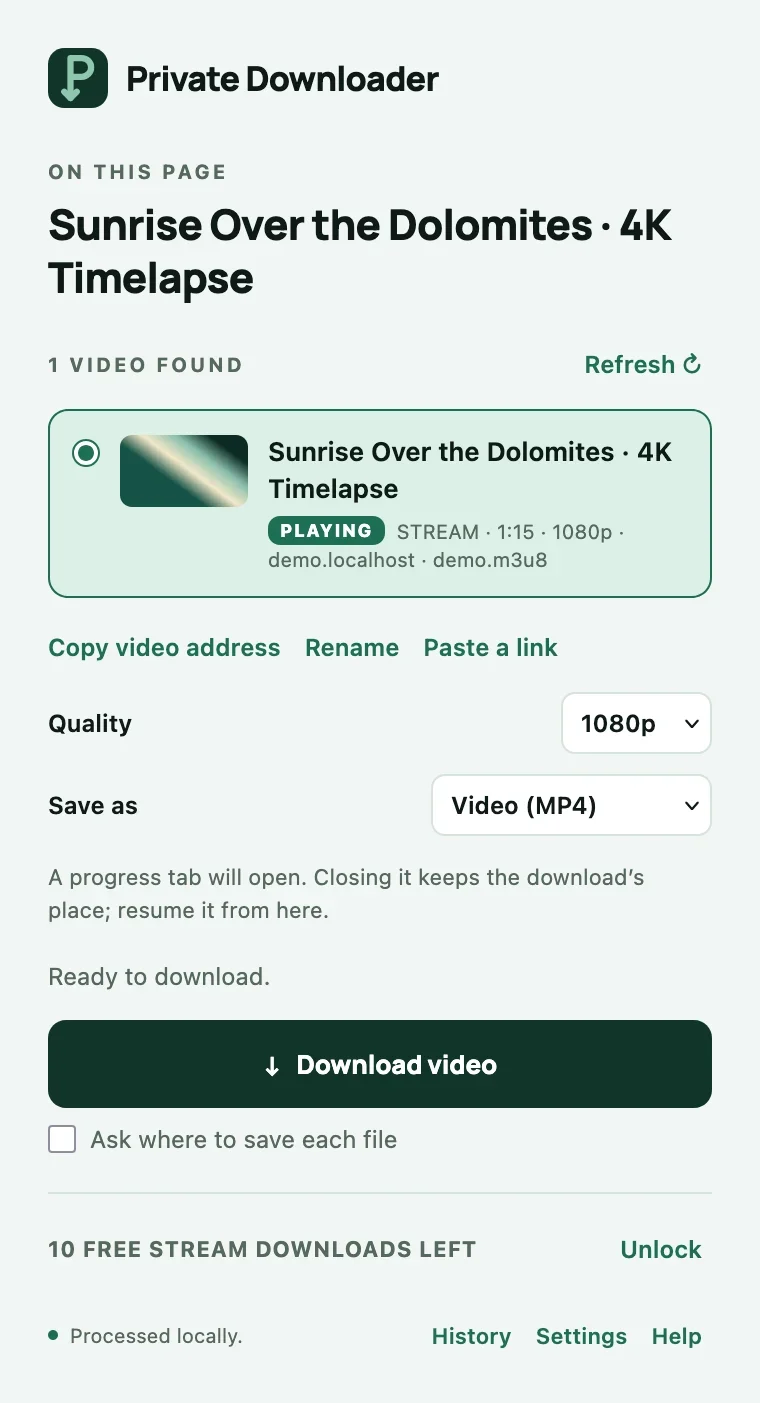
Pause any stream download. A dropped connection is waited out and the download continues where it was. Close the tab or quit the browser, and it resumes later from the same place.
No size limit
Streams are assembled on your disk, not in memory, so a three-hour recording is as safe as a three-minute clip. Four segments are fetched at a time.
Never a silent loss
A stream whose video or audio could not be saved is refused with a reason, not saved without it. The popup names DRM, live, and unsupported streams before you start.
Tested on every release
Every version runs hundreds of automated checks in real Firefox, Chrome, Edge, and Firefox for Android, and every file they save is opened and checked to prove it plays.
How it works
- Start the video. The toolbar badge shows how many videos the extension can see on the page.
- Click the toolbar button, press Alt+Shift+S, or right-click the video and choose Download this video. Pick quality, audio language, subtitles, or audio only, rename the file, or select several videos at once.
- Direct files go straight to your Downloads folder. Streams are assembled on your disk in a progress tab and saved as one file, with Show in folder and Open when they finish. A local history keeps your last fifty saves.
Pricing
Free
$0
- Ten downloads, files and streams alike, to prove it works on your sites
- Every format: direct files, HLS, DASH, live streams, and recordings
- Every feature, no watermark, no account
- No cooldowns, no daily caps, and a download is never stopped halfway to ask for payment
Unlocked
$19
- Unlimited downloads and recordings
- One payment, no subscription
- One key for all your own browsers and devices, checked offline
- Lost it? Claim it again at any time with the email you bought with
Already bought? Claim your key.
Sold through Link, Stripe's merchant of record, which handles payment, tax, and receipts. 30-day money-back guarantee if it does not work on your sites.
Coming from Video DownloadHelper?
It is the best-known downloader, and it has earned that. Here is how the two compare on price, free downloads, subtitles, Android, and privacy, from its own pages.
Install
Private Downloader for Firefox is on Firefox Add-ons, reviewed by Mozilla. It runs on Firefox 140 or later, and the same listing installs it on Firefox for Android 142 or later.
The Chrome and Edge versions are built and tested and are being submitted to the Chrome Web Store and Edge Add-ons; their links will appear here once each store approves them. The extension speaks English, German, French, Spanish, Portuguese, Italian, and Japanese.
What it will not do
It refuses DRM-protected and sample-encrypted streams, and never bypasses a login or paywall: it saves what your browser can already play. YouTube is refused on every browser by policy. Please respect the terms of the sites you use.
Questions
Does it download from YouTube?
No. YouTube is refused on every browser, by policy: the Chrome Web Store removes extensions that download from it, and its terms forbid downloading. Private Downloader is for the rest of the web: news and broadcasters, courses and talks, social video, and the players other sites embed.
Can it save DRM-protected video?
No. Video protected with DRM (Widevine, PlayReady, or FairPlay), as streaming services use, is refused, and the popup says so before you start. It never bypasses a login, a paywall, or encryption designed to prevent copying.
Is it really private? How can I tell?
Everything happens inside the extension, and you can check it. The store listing declares that no data is collected. There is no remote code, so what Mozilla's reviewers read is what runs. Open your browser's network tools while you download: requests go only to the site you are watching. The license check happens on your device, with no connection needed.
What happens after the ten free downloads?
Downloads then need the one-time $19 key. There is no cooldown and no daily cap, and a download that has started is never stopped to ask for payment. A download that fails or is canceled gives its free save back.
Which sites does it work on?
It works by format rather than by site: direct files, HLS, DASH, Smooth Streaming, and players that hide their source, so most sites that play video in the browser work. The ten free downloads are there to try it on your sites before you buy, and the 30-day refund covers you if one does not work.
I lost my key.
Claim it again at any time on the claim page with the email address you bought with. Keys are worked out from your order, so you always get the same key back.
Can I use one key on several computers or browsers?
Yes. One key works on all your own devices and browsers. Paste it into each one; nothing needs to be activated online.
How do refunds work?
Within 30 days of purchase, email us from the address you bought with and we refund the full amount to your original payment method. You can also ask Link, the seller of record, through link.com. We only ask what we need to find the order.
Does it work on Android?
Yes, in Firefox for Android 142 or later. Firefox asks before it saves each file, and the file goes to your phone's Download folder.
Does it lower the quality or re-encode?
No. Streams are repackaged exactly as the site sent them, at the quality you choose, so nothing is lost and saving is fast.
Is there a Chrome or Edge version?
Yes. Both are built and tested, and on their way to the Chrome Web Store and Edge Add-ons. One key will work in all of them.
Support
Email privatedownload.energetic190@passmail.net. If a download fails, click Help in the popup and copy the privacy-safe report into your message; it contains no page addresses, titles, tokens, or cookies.